
Guide · Study
AI flashcards: how to make them and study smarter
In this guide
Flashcards remain one of the most efficient ways to lock in vocabulary, concepts, and procedures. When AI helps you build the deck and review brings back what you miss sooner, you stop drilling what you already know and spend time where you still fail. This guide covers the method and how to apply it in Zapiens with no install.
What is an AI flashcard (and what it is not)?
A classic flashcard has a front (prompt) and a back (answer). An AI flashcard keeps that shape, but AI can suggest new cards and rephrase examples. And if you review with spaced repetition, the cards you miss come back sooner. It does not replace your judgment: you pick the topic and collection. AI speeds up creation; you review what it suggests.
When AI flashcards shine
Especially useful for: • Languages (vocab, collocations, short phrases). • Subjects packed with definitions and formulas. • Team onboarding glossaries. For long essays or projects, pair cards with reading and productive practice. Cards excel at short- and mid-term retention.
Practical signal
If you can answer in a phrase or a concrete fact, it is a good card. If you need a paragraph, split it or use another practice mode.
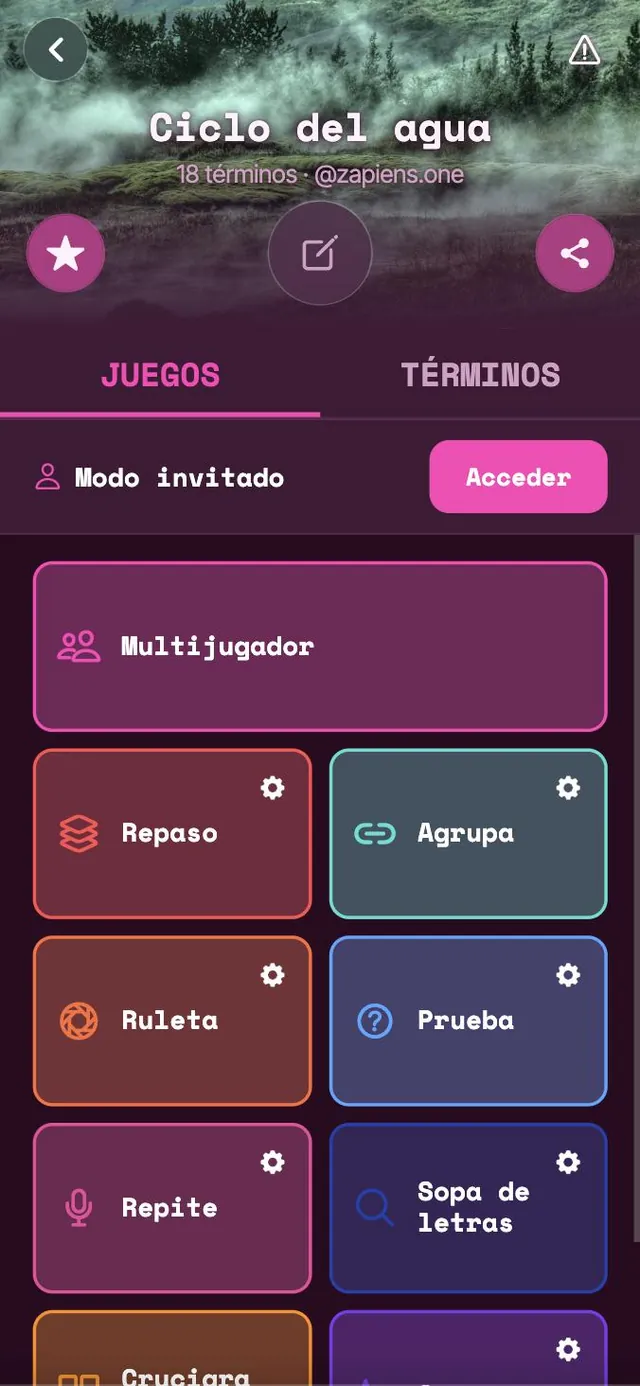
How to practice flashcards on Zapiens
On play.zapiens.one you pick a collection, enter a practice mode, and see an XP result. You can study solo or in game-style modes. The web app runs in the browser — desktop and mobile, no store required. Start with a short deck (20–40 cards), practice 10–15 minutes, and return the next day. Consistency beats cramming.
Common mistakes
• Building huge decks on day one and abandoning them. • Only recognizing answers (passive reading) instead of recalling. • Skipping hard cards — they have the highest ROI. • Never speaking answers aloud when the goal is speaking fluency.
How to start on Zapiens today
Open Zapiens, pick or generate a collection with AI, and finish one short session today. For the spacing framework between sessions, read our spaced repetition guide.
Practice it in Zapiens
Turn your topic into a lesson.
The AI proposes the cards and you review them. Then you practice the lesson eight ways, not just with cards.